

Disclosure: As an Amazon Associate, I earn from qualifying purchases.

Where to buy
Price and availability are on Amazon. The button opens Amazon in a new tab.
The review
The Selore Laptop Docking Station is worth considering if you need a Windows dock for three external monitors and can work within its stated display limits; its listed price is $69.991. The listing describes a 17-in-1 design, but macOS is limited to mirror mode or one extended display, and three-screen output allocates 4K@30Hz to the third port1.
Key facts
- The dock is advertised as a 17-in-1 unit with three HDMI ports and two DisplayPort ports1.
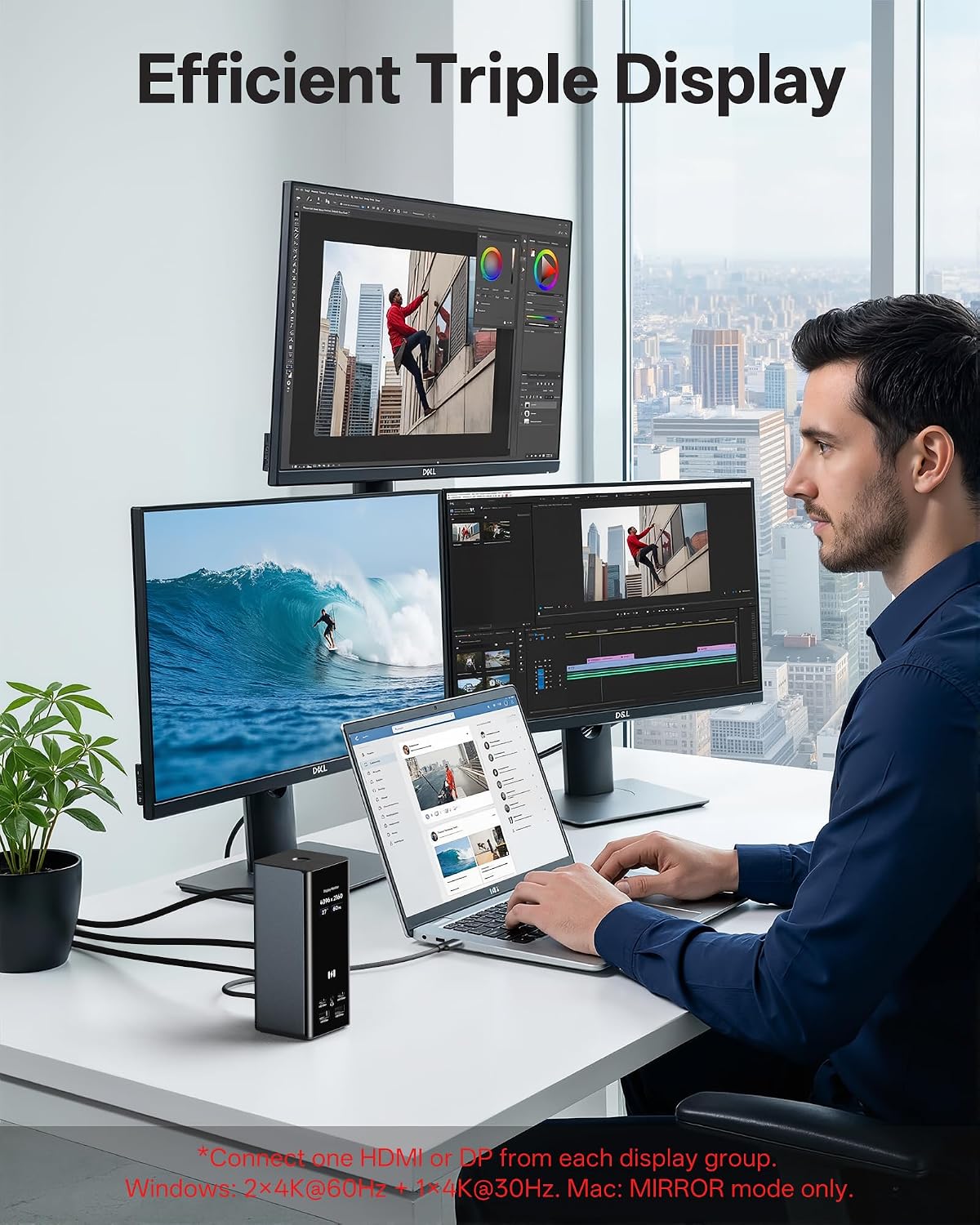
- For a three-screen setup, the listing allocates 4K@60Hz to the first two ports and 4K@30Hz to the third1.
- The listing states that Windows supports triple extended displays using MST, while macOS supports mirror mode or one extended display1.
- Power specifications state 100W PD input and up to 85W output to a connected laptop1.
- The listed price is $69.99, and the customer rating is 4.3 out of 5 stars1.
What does the Selore Laptop Docking Station offer for connecting three monitors?
The Selore Laptop Docking Station is advertised as a 17-in-1 dock with three HDMI ports and two DisplayPort ports1. For three monitors, the product description recommends HDMI 1 + HDMI 2 + HDMI 3, HDMI 1 + HDMI 2 + DP 2, or HDMI 1 + DP 1 + HDMI 31. Those are the listed combinations; the available information doesn’t establish that every other combination will work the same way.
The Selore Laptop Docking Station also lists five USB ports, Gigabit Ethernet, and SD and microSD card readers1. The port specification mentions USB data rates of 10Gbps and 5Gbps, while the card-reader specification says SD/microSD 3.01. This gives you a range of connection types alongside the display outputs, but the listed port count alone doesn’t confirm the performance of every port when all are in use.
The Selore Laptop Docking Station connects to a laptop using a USB-C cable1.
What can the Selore Laptop Docking Station run across three 4K monitors?
The Selore Laptop Docking Station’s stated three-monitor allocation is 4K@60Hz on the first two ports and 4K@30Hz on the third1. That makes the third output the stated refresh-rate limitation in a three-screen setup. The listing doesn’t identify which recommended port combination, if any, changes that allocation.
The Selore Laptop Docking Station listing separately claims that its HDMI ports support 4K@60Hz and its DisplayPort ports support 8K@30Hz1. Those individual port capability claims shouldn’t be read as a promise that all three connected screens can run at the highest listed resolution and refresh rate simultaneously: the product description gives a distinct, lower third-screen rate for three displays1.
The Selore Laptop Docking Station information doesn’t provide further detail about performance across every possible port combination or explain how connected laptop models affect the result. Treat the three-screen allocation as the published specification, not a test result. If your workload depends on a particular combination or refresh rate, that specific outcome remains unconfirmed by the available listing information.
Which laptops and operating systems are compatible with the Selore Laptop Docking Station?
The Selore Laptop Docking Station is described as connecting through a USB-C cable and supporting laptops running Windows, macOS, or Chrome OS1. The listing names Dell, HP, Lenovo, Asus, and Acer among compatible laptop brands, including USB-C and Thunderbolt laptops1. Those brand examples don’t amount to a model-by-model compatibility check for every device in each range.
The Selore Laptop Docking Station has different stated display behavior by operating system: Windows supports triple extended display using MST, while macOS is limited to mirror mode or one extended display1. That distinction matters if you expect three independent screens. The broad operating-system and connection descriptions don’t establish that every laptop with a USB-C or Thunderbolt port supports every display mode.
The Selore Laptop Docking Station listing provides some example compatible devices, but the available information doesn’t confirm display-output support for every specific laptop model1. Check your laptop’s display capabilities against the intended setup before relying on triple-screen output.

Does the Selore Laptop Docking Station need DisplayLink or DisplayPort Alt Mode?
The Selore Laptop Docking Station listing describes a USB-C connection and says Windows triple extended display uses MST1. It doesn’t state whether DisplayLink drivers are required. The available information also doesn’t specify whether the laptop must support DisplayPort Alt Mode, so neither requirement can be confirmed from the listing.
The Selore Laptop Docking Station’s stated Windows MST mode is useful information about how the listing describes triple extended displays, but it doesn’t answer the separate questions about DisplayLink software or DisplayPort Alt Mode support1. Don’t assume that the presence of a USB-C connector alone settles either question.
Before depending on a three-display configuration, check that your laptop supports the required display output and confirm any driver or connection-mode requirements with information for your exact laptop and the dock. The Selore Laptop Docking Station material available here doesn’t provide those details or a model-by-model compatibility check beyond its examples1.
How much laptop power does the Selore Laptop Docking Station provide, and what adapter does it need?
The Selore Laptop Docking Station lists 100W PD input and up to 85W output to a connected laptop1. The two figures refer to different sides of the power arrangement: the listed 100W is the dock’s input rating, while 85W is the stated maximum passed through to the laptop. Don’t treat the input figure as the laptop’s stated charging output.
The Selore Laptop Docking Station description says an 87W-or-higher charger is required and that the charger isn’t included. It also describes approximately 85W pass-through charging1. That means you’ll need to supply a suitable adapter separately; the available information doesn’t identify a particular charger model.
The Selore Laptop Docking Station power specification is a listing claim, not a measurement from our testing1. The available details don’t establish the power available to the laptop under every combination of connected displays and accessories. If you need a specific charging rate, check the laptop’s own requirements alongside the dock’s stated input and output figures.

How do you connect and configure three monitors with the Selore Laptop Docking Station?
The Selore Laptop Docking Station connects to the laptop through its USB-C host cable, according to the product description1. Connect the monitors using one of the listed combinations: HDMI 1 + HDMI 2 + HDMI 3, HDMI 1 + HDMI 2 + DP 2, or HDMI 1 + DP 1 + HDMI 31. These are the recommended combinations in the available product information.
The Selore Laptop Docking Station description identifies Windows MST as the mode for triple extended displays1. For macOS, the stated options are mirror mode or one extended display, rather than three independent external displays1. So the operating system changes what you can expect from the monitor arrangement.
The Selore Laptop Docking Station listing doesn’t provide detailed, step-by-step operating-system configuration instructions. It doesn’t specify display menus to use or driver steps, so those shouldn’t be inferred from the connection and MST claims. Confirm that your laptop supports the intended display output before assembling a three-screen setup; the listing’s general compatibility examples aren’t a check for every model1.
What display limitations should you know about before choosing the Selore Laptop Docking Station?
The Selore Laptop Docking Station listing says macOS supports mirror mode or one extended display, not three independent external displays1. That makes the dock a poor fit if your requirement is three separate external workspaces on macOS. The listing attributes the limitation to an Apple chip limitation, but the available information doesn’t provide a model-by-model check1.
The Selore Laptop Docking Station’s stated three-screen allocation is 4K@60Hz for the first two ports and 4K@30Hz for the third1. The separate claims for HDMI 4K@60Hz and DisplayPort 8K@30Hz don’t replace that three-monitor allocation1. Plan around the stated third-screen rate rather than assuming all three outputs share the individual-port maximum.
The Selore Laptop Docking Station information doesn’t specify HDCP support, so that capability is unknown. It also doesn’t detail performance for every port combination. Buyers who need a particular refresh rate, copy-protection support, or three independent macOS displays should treat those points as unconfirmed or unsupported as stated, rather than assume compatibility.
How much does the Selore Laptop Docking Station cost, and what comes in the box?
The Selore Laptop Docking Station is listed at $69.99, with a list price of $79.991. These are the prices shown in the listing information provided; no additional pricing terms are specified here.
The Selore Laptop Docking Station product description names the dock, a USB-C host cable, and a user manual as the box contents. It says the power adapter is sold separately. The description also says an 87W-or-higher charger is required, so account for that separate adapter when considering the listed price.
The Selore Laptop Docking Station has a customer rating of 4.3 out of 5 stars1. That rating offers buyer-rating context, not a measurement of display performance or charging output. The available material doesn’t include individual buyer comments, so it can’t establish what owners particularly liked or disliked. The product description’s included-item and power details are listing claims, not a firsthand inspection of the box.
What do buyers say about the Selore Laptop Docking Station?
The Selore Laptop Docking Station has a listed customer rating of 4.3 out of 5 stars1. That figure is a rating, not a tested performance result, and it doesn’t by itself explain how buyers experienced the dock.
The Selore Laptop Docking Station material available for this review doesn’t include individual buyer-review comments. As a result, there’s no supported basis here for summarizing reported experiences, recurring praise, or common complaints. The rating can be reported as context, but it can’t substitute for the missing comments.
The Selore Laptop Docking Station’s port, resolution, operating-system, and power details are product-listing specifications rather than buyer opinions1. Keep those claims separate from customer feedback: the available rating doesn’t verify that a particular laptop configuration achieves the stated display modes or charging output. To judge those points, use the published specifications cautiously and confirm compatibility for your own setup.

Pros and Cons
Pros
- The advertised 17-in-1 design includes three HDMI ports, two DisplayPort ports, five USB ports, Ethernet, and SD/microSD readers1.
- The listing provides three recommended port combinations for connecting three monitors1.
- The listing names Windows, macOS, and Chrome OS and examples of USB-C and Thunderbolt laptop brands1.
Cons
- The listing says macOS is limited to mirror mode or one extended display, not three independent external displays1.
- In the stated three-monitor allocation, the third output is limited to 4K@30Hz1.
- The power adapter is sold separately, and the description requires an 87W-or-higher charger1.
- The available listing information doesn’t confirm DisplayLink driver or DisplayPort Alt Mode requirements1.
- The available material doesn’t specify HDCP support or performance across every possible port combination1.
Final Verdict
Consider the Selore Laptop Docking Station if you want its listed mix of display, USB, Ethernet, and card-reader ports and your Windows laptop supports the required display output; the listing describes triple extended displays using MST and prices the dock at $69.991. Skip it if you need three independent external displays on macOS, or if the third display must run above the stated 4K@30Hz allocation1. You’ll also need to supply an 87W-or-higher charger separately1.
Key Takeaways
- Consider the dock for Windows triple-display use only after checking your laptop’s display-output support; the listing describes Windows MST for three extended displays1.
- Plan for two outputs at 4K@60Hz and the third at 4K@30Hz when using three screens1.
- Do not choose it for three independent external displays on macOS; the listing states mirror mode or one extended display only1.
- Budget separately for an 87W-or-higher charger, which the description says isn’t included1.
Frequently Asked Questions
Can the dock run three independent displays on macOS?
What refresh rates are stated for three connected monitors?
The listing allocates 4K@60Hz to the first two ports and 4K@30Hz to the third in a three-monitor setup1.
Is a power adapter included?
No; the description says the power adapter is sold separately and requires an 87W-or-higher charger1.
Does the listing confirm DisplayLink or DisplayPort Alt Mode requirements?
No; it describes Windows MST and a USB-C connection but doesn’t specify DisplayLink driver or DisplayPort Alt Mode requirements1.
What is the listed customer rating?
The product listing reports a customer rating of 4.3 out of 5 stars1.
Sources
Check today’s price and the exact model on Amazon.