

Disclosure: As an Amazon Associate, I earn from qualifying purchases.

Where to buy
Price and availability are on Amazon. The button opens Amazon in a new tab.
The review
The VVB USB C Laptop Docking Station is worth considering if your laptop’s USB-C port supports video output and you need several connection types, but its listed display modes and MacBook mirroring limitation deserve a close check first. The listing price is $49.99, and the product is shown as In Stock; those are listing details, not a performance assessment.1
Key facts
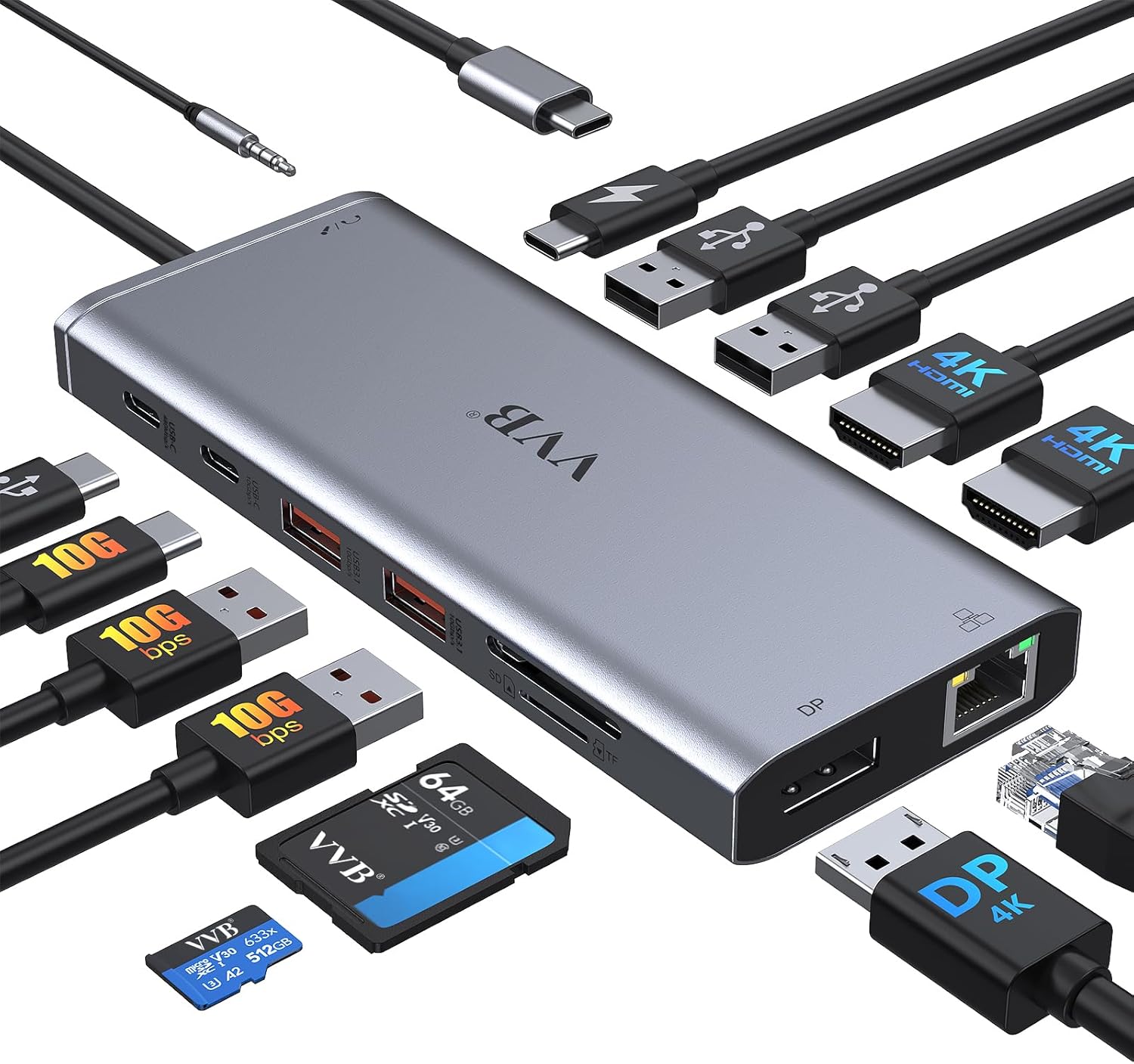
- The VVB dock is listed as a 14-port adapter with two HDMI ports, DisplayPort, Ethernet, USB connections, a card reader and an audio jack.1
- The listing gives single-output limits of up to 4K at 60Hz for HDMI 1 or DisplayPort, and up to 4K at 30Hz for HDMI 2.1
- For dual displays, the listing specifies 4K at 30Hz and 1080p at 60Hz for DP1.4.1
- The dock lists 100W USB-C Power Delivery input, with charging output limited to 87W; the charging cable and adapter aren’t included.1
What does the USB C Laptop Docking Station do, and how does it connect two HDMI monitors?
The VVB USB C Laptop Docking Station is a listed 14-port adapter that connects to a laptop through one USB-C, Thunderbolt 3/4 or Type-C port. Its advertised connections include two HDMI ports, DisplayPort, Ethernet, USB-A and USB-C ports, a card reader and a 3.5mm audio jack.1
For two HDMI monitors, the listing describes connecting each display to an HDMI port, but the laptop’s USB-C port must support video output; the listing warns that not every USB-C device is compatible.1 The USB C Laptop Docking Station is listed at $49.99 and shown as In Stock.1
Those are product-page details, not evidence of tested performance. The USB C Laptop Docking Station combines display and peripheral connections, while the USB C Laptop Docking Station’s actual video capability depends on the host laptop meeting the stated port condition.1
Does my laptop’s USB-C port support two external displays?
Your laptop’s USB-C port needs video-output functionality for the VVB dock’s HDMI or DisplayPort connections to work. The listing explicitly warns that not every USB-C device is compatible and says an incompatible device cannot use those video outputs.1
The product information names USB-C and Thunderbolt 3/4 connections, but it doesn’t provide model-by-model support requirements or establish that USB4 is required.1 It also doesn’t identify DisplayPort Alt Mode by name, so you shouldn’t treat that specific technology as confirmed from the supplied information.
Before choosing the USB C Laptop Docking Station, check whether the exact port on your laptop supports video output and whether your laptop supports the display arrangement you want. The USB C Laptop Docking Station’s compatibility examples don’t verify every configuration, and the USB C Laptop Docking Station has no supplied test result for your particular laptop.1
What resolutions and refresh rates does this dock list for two HDMI monitors?
The VVB dock’s listing gives different limits for single-display use: HDMI 1 or DisplayPort can reach up to 4K at 60Hz, while HDMI 2 is listed up to 4K at 30Hz.1
For dual displays, the listing states a combination of 4K at 30Hz and 1080p at 60Hz, specified for DP1.4.1 That is a listed specification, not an independently verified result, and the product information doesn’t clarify every possible pairing of monitor, port and laptop.
The listing also gives a 1080p limit for triple displays on DP1.4 and warns that MacBook laptops support only the same image on external monitors.1 If you’re considering the USB C Laptop Docking Station for two displays, compare your intended resolution and refresh rates with those stated limits. The USB C Laptop Docking Station’s figures remain listing claims; the supplied sources don’t establish results for your exact setup.1

Should I choose DisplayLink or USB-C DisplayPort Alt Mode for dual monitors?
The listing describes video output through USB-C or Thunderbolt connections and gives dual-display limits for DP1.4, but it doesn’t identify the dock’s display technology as DisplayLink or explain a DisplayLink setup.1
That leaves an important gap: the supplied product information doesn’t support a verified, product-specific comparison between DisplayLink and USB-C DisplayPort Alt Mode. It names neither DisplayLink nor DisplayPort Alt Mode, so attributing either approach to this dock would go beyond the available evidence.
Before selecting the USB C Laptop Docking Station, confirm the dock’s display technology with a reliable product source and check that your laptop supports it. The listing’s DP1.4 limits alone don’t establish the full implementation.1 The USB C Laptop Docking Station may suit a buyer whose host and displays match the stated requirements, but the available information doesn’t establish which approach is better for you. The USB C Laptop Docking Station’s listing cannot resolve that choice.1
How much does this dock cost, and what do its ports and power delivery offer?
The VVB dock is listed at $49.99 and marked In Stock.1 The listing describes 14 ports, including two HDMI connections, DisplayPort, Gigabit Ethernet, USB-A and USB-C connections, SD/Micro SD card reading and a 3.5mm audio jack.1
For power, the dock lists up to 100W USB-C Power Delivery input but says charging output is limited to 87W. The charging cable and adapter aren’t included, and the laptop’s USB-C port must support Power Delivery for charging.1
The USB C Laptop Docking Station therefore combines a broad set of listed ports with a stated charging ceiling. The available information provides no comparison with other docks, so typical market pricing can’t be established from these sources. The USB C Laptop Docking Station’s listed price is a current product-page detail, not evidence that it costs less than alternatives.1

How do I set up two HDMI monitors through this dock on Windows or macOS?
The listing calls the dock plug and play, but it still requires a laptop connection with USB-C video-output functionality for the HDMI or DisplayPort video outputs.1 The product information doesn’t provide a step-by-step procedure for arranging displays in Windows or macOS.
For two displays, the listing claims 4K at 30Hz and 1080p at 60Hz for DP1.4; it also says MacBook laptops support only the same image on external monitors.1 Treat these as stated specifications rather than results independently verified for your computer.
The listing’s operating-system fields include Windows 7 and Windows 10, as well as Mac OS 9, but those details don’t explain which display settings to select or confirm current compatibility for a particular computer.1 When setting up the USB C Laptop Docking Station, first confirm the laptop port’s video function; the USB C Laptop Docking Station listing leaves the exact configuration steps to the user.1
What limitations could affect display output, charging or performance?
The main stated display condition is host compatibility: the laptop’s USB-C port must support video output, and the listing warns that incompatible devices can’t use the dock’s HDMI or DisplayPort outputs.1
The listed dual-display combination is 4K at 30Hz and 1080p at 60Hz for DP1.4, while the listing says MacBook laptops show the same image on external monitors.1 The supplied information doesn’t substantiate broader compatibility or performance claims beyond those statements.
Charging output is limited to 87W despite 100W Power Delivery input, and the charging cable and adapter aren’t included.1 The listing also warns against using a converter.1 Check those conditions before relying on the USB C Laptop Docking Station for a particular workstation. The USB C Laptop Docking Station’s claims don’t confirm how it will perform with your exact equipment, and the USB C Laptop Docking Station’s listing does not supply independent test results.
How can I check whether this dock works with my laptop and two monitors?
Start by checking whether the specific USB-C port on your laptop supports video output; the listing makes that a condition for using the dock’s HDMI and DisplayPort connections.1
Then compare your intended two-monitor arrangement with the stated dual-display combination of 4K at 30Hz and 1080p at 60Hz for DP1.4.1 The listing doesn’t verify that result for every laptop and pair of monitors, so treat it as a specification to check rather than a guarantee.
The product page names Dell, HP and Lenovo among compatible-device examples, but that claim doesn’t confirm support for every model from those brands.1 Before buying the USB C Laptop Docking Station, verify the exact laptop port and display support against the information for your devices. The USB C Laptop Docking Station’s supplied sources give no confirmed compatibility result for your exact laptop and monitors, so that remains unknown. The USB C Laptop Docking Station’s listed examples are not a substitute for that check.1

Pros and Cons
Pros
Cons
- The laptop’s USB-C port must support video output, and the listing warns that some devices are incompatible.1
- The listing says MacBook laptops show the same image on external monitors.1
- Charging output is limited to 87W, and the charging cable and adapter aren’t included.1
- The listing warns against using a converter.1
Final Verdict
Consider the VVB dock if you need its listed mix of 14 ports and your laptop’s USB-C port supports video output. Before purchasing, confirm compatibility for your exact laptop and displays, especially if you need separate images on a MacBook or charging above the listed 87W output. The product page lists it at $49.99, but the supplied information doesn’t establish comparative market value or independently verified performance.1
Key Takeaways
- Confirm that your specific laptop USB-C port supports video output before relying on HDMI or DisplayPort.1
- Check whether the stated dual-display combination of 4K at 30Hz and 1080p at 60Hz suits your monitors.1
- Factor in the 87W charging-output limit and the separately needed charging cable and adapter.1
- Treat the listed brand examples as claims, not confirmation for every laptop model.1
Frequently Asked Questions
Does the VVB dock require Thunderbolt for two monitors?
The listing names USB-C and Thunderbolt 3/4 connections, but says the laptop’s USB-C port must support video output; it doesn’t establish that Thunderbolt is required.1
Can two monitors show different images on a MacBook?
The listing warns that MacBook laptops support only the same image on external monitors.1
Is the charging cable included?
No. The listing says the charging cable and adapter aren’t included, and charging output is limited to 87W.1
What does the listing say about dual-display resolution?
It lists 4K at 30Hz and 1080p at 60Hz for dual displays on DP1.4; this is a listing claim, not an independently verified result.1
Sources
Check today’s price and the exact model on Amazon.